How to Text Guests When Their Order Is Ready (Twilio + Elegant Menu Setup Guide)
Send guests an SMS the moment their take-away order is ready. Connect your own Twilio account to Elegant Menu in 6 steps: Account SID, a restricted API key and a sender number.
On this page
- Before you start
- Step 1: Copy your Account SID
- Step 2: Create a new API key
- Step 3: Name the key and choose "Restricted"
- Step 4: Give the key Messaging permissions
- Step 5: Copy the SID and the secret (shown only once)
- Step 6: Paste everything into Elegant Menu SMS page and switch SMS on
- Optional: show your restaurant's name as the sender
- Test it before your next busy service
- If the SMS doesn't arrive
- Frequently asked questions
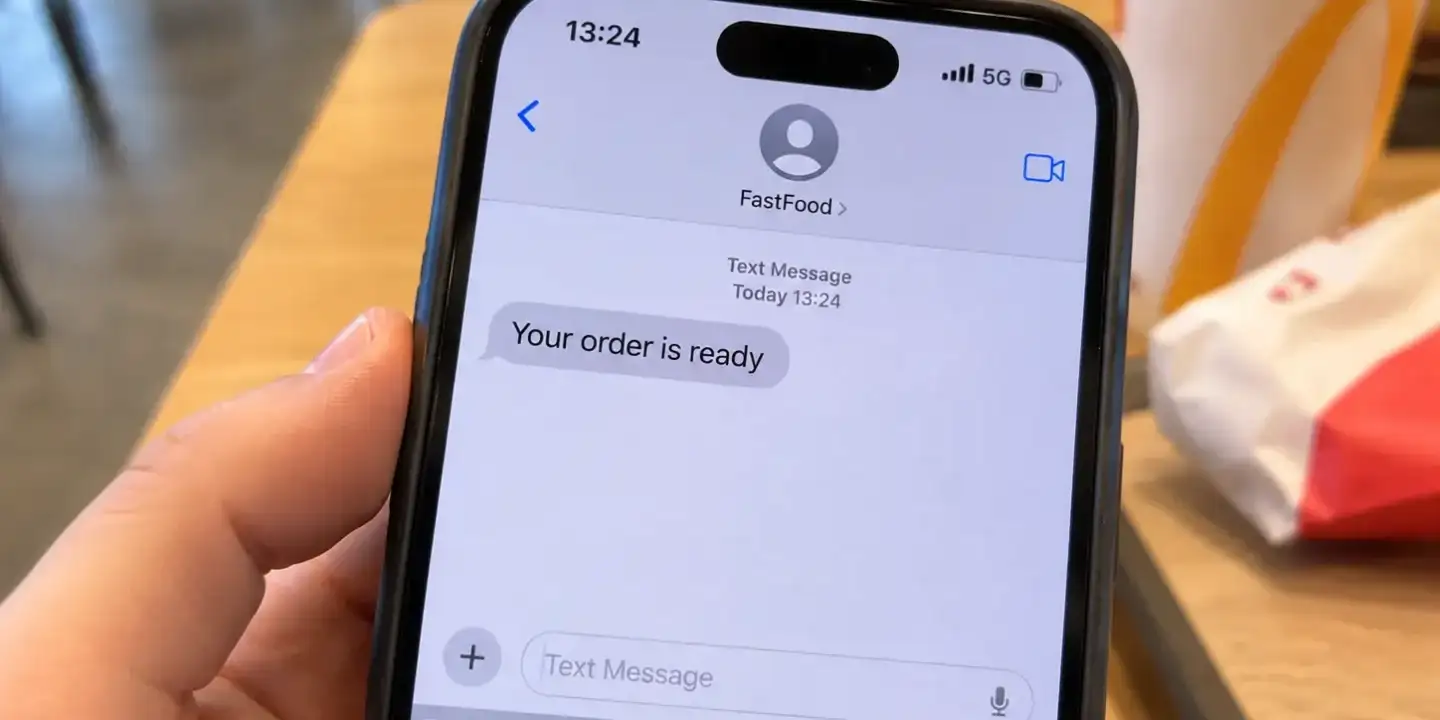
Guests waiting for a take-away order want one thing: to know when it is ready. With Elegant Menu you can send them a text message the moment their order is ready, so nobody crowds the counter or asks “is mine done yet?”.
The messages are sent from your own Twilio account. You create a few credentials in Twilio, paste them into your Elegant Menu dashboard, and switch the feature on. You can even have the message show your restaurant’s name instead of a phone number. This guide walks you through every click, with screenshots.
Before you start
- An Elegant Menu Standard or Premium plan. Order-ready SMS is included in these two plans.
- A Twilio account. You can sign up at twilio.com. Twilio bills you directly for every message you send.
- A Twilio phone number that can send SMS. This is the sender your guests see, unless you set up your restaurant’s name as the sender (see Show your restaurant’s name as the sender).
You will collect four values from Twilio and paste them into Elegant Menu:
| Elegant Menu field | Where you find it in Twilio | Looks like |
|---|---|---|
| Account SID | Twilio Console home page | Starts with AC |
| API key SID | Shown when you create an API key | Starts with SK |
| API key secret | Shown once, right after you create the API key | A long random string |
| Sender number | Your Twilio phone number, or a Messaging Service SID if you want your restaurant’s name as the sender | + country code + number, or starts with MG |
Elegant Menu stores these values securely with encryption.
Step 1: Copy your Account SID
Log in to the Twilio Console. On the home page you will see your account card with Account SID and Auth Token. Click the copy icon next to the Account SID and keep it somewhere safe for Step 6.
You do not need the Auth Token. Elegant Menu uses an API key instead, which you can revoke at any time without affecting the rest of your Twilio account. Click API keys & auth tokens under the card to continue.
Step 2: Create a new API key
On the API keys tab, click the blue Create API key button.

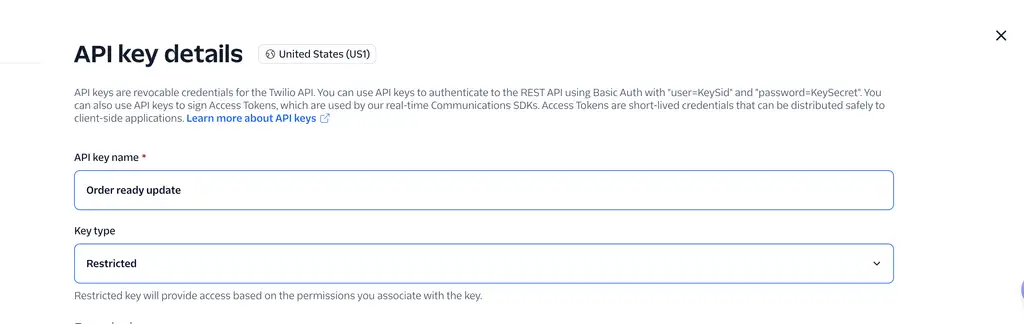
Step 3: Name the key and choose “Restricted”
- API key name: anything that tells you what it is for, for example Order ready update.
- Key type: choose Restricted. A restricted key can only do what you allow in the next step, which is the safest choice for a key you paste into another service.
Step 4: Give the key Messaging permissions
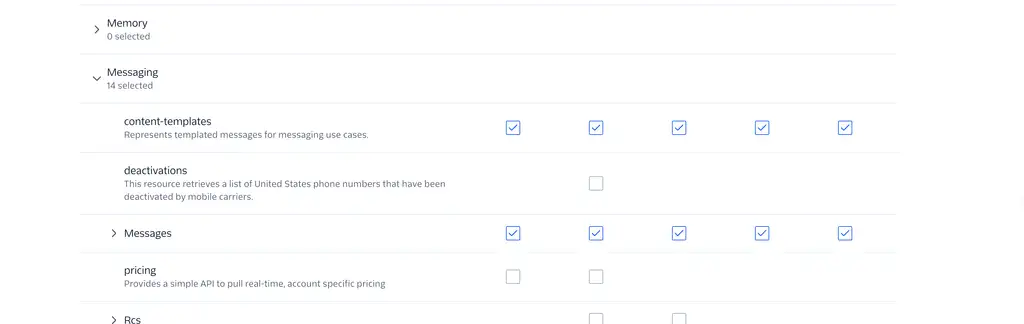
Scroll down to the permissions list and open Messaging. Tick every box on these two rows:
- content-templates
- Messages
Leave everything else unticked. Then create the key.
Step 5: Copy the SID and the secret (shown only once)
Twilio now shows two values:
- SID (starts with
SK): this is your API key SID. - Client secret: this is your API key secret.
Important: Twilio shows the secret only once. Copy both values now, store them in a safe place (a password manager is ideal), then tick “Got it!” to close the page. If you lose the secret, delete the key and create a new one.
Step 6: Paste everything into Elegant Menu SMS page and switch SMS on
In your Elegant Menu dashboard, go to the Your Twilio account section and fill in the four fields:
- Account SID: from Step 1 (
AC…). - API key SID: from Step 5 (
SK…). - API key secret: the client secret from Step 5.
- Sender number: your Twilio phone number in international format, starting with
+and the country code. If you want guests to see your restaurant’s name instead, paste a Messaging Service SID here (see the next section).
Then set the two switches:
- Text guests when their order is ready: turn this on to start sending messages.
- Phone number is required: while SMS is on, take-away orders ask the guest for a phone number. Turn this on if you want to make sure guests cannot skip it.
Click Save. That’s it.
Optional: show your restaurant’s name as the sender
Instead of a phone number, guests can see your restaurant’s name at the top of the message, for example FRANCOPIZZA. Twilio calls this an Alphanumeric Sender ID. You set it up in Twilio, then give Elegant Menu a Messaging Service SID instead of a phone number.
Check these first
- A paid Twilio account. Sender names are not available on Twilio free trial accounts.
- Your guests’ country supports it. Not every country allows sender names, and some require you to register the name before you can use it. Check Twilio’s list of supported countries. Where registration is required, Twilio asks for information about your business and reviews it before the name can be used.
- The name fits the rules. Up to 11 characters, using letters, digits and spaces, with at least one letter.
- Guests can’t reply. Messages sent under a name are one-way.
Set it up in Twilio
- Turn on sender names for your account. In the Twilio Console, open Messaging → Settings → General and check that Alphanumeric Sender ID is set to Enabled.
- Create a Messaging Service. Open Messaging → Services, click Create Messaging Service and give it a name, for example Order ready.
- Add your restaurant’s name. In the new service, open Sender Pool, click Add Senders, choose Alpha Sender, click Continue and type the name guests should see.
- Add your Twilio phone number to the same Sender Pool. When a guest’s country doesn’t support sender names, Twilio sends the message from this number instead, so the guest still gets it.
- Copy the Messaging Service SID. You find it on the service’s properties page. It starts with
MG.
Add it to Elegant Menu
In the Your Twilio account section, paste the Messaging Service SID (MG…) into the Sender number field instead of your phone number, and click Save. Your Account SID, API key SID and API key secret stay the same.
Test it before your next busy service
Place a take-away order on your own menu using your own mobile number, then mark it as ready in your dashboard. You should receive the text within a few seconds. If nothing arrives, check the points below.
If the SMS doesn’t arrive
- You are on a Twilio trial account. Trial accounts can only send messages to phone numbers you have verified in Twilio. To text any guest, upgrade your Twilio account (see Twilio’s trial account guide).
- You send to US numbers from a US local number. US carriers require A2P 10DLC registration for messages sent from local (10-digit) numbers. Toll-free numbers need their own verification.
- A value was pasted with a space or a missing character. Copy the Account SID, API key SID and secret again with the copy icons rather than selecting the text by hand.
- The key is missing permissions. Open the key in Twilio and check that the Messaging rows from Step 4 are ticked.
- The sender number can’t send SMS to that country. Some Twilio numbers are voice-only or domestic-only. Check the number’s capabilities in the Twilio Console.
- You use a sender name and nothing arrives. Check that Alphanumeric Sender ID is enabled for your account, that the name is registered if the guest’s country requires it, and that your Messaging Service also has a phone number in its Sender Pool.
SMS rules differ from country to country, and because messages go out from your own Twilio account, you are responsible for following the rules that apply where you operate.
Frequently asked questions
Who pays for the text messages?
Twilio bills you directly for the messages, at Twilio’s rates for your country. Messages are sent from your own Twilio account.
Which Elegant Menu plans include order-ready SMS?
The Standard and Premium plans.
Can guests see my restaurant’s name instead of a phone number?
Yes, in countries that support sender names. Create a Messaging Service with your name as an Alpha Sender in Twilio and paste its SID (MG…) into the Sender number field. See Show your restaurant’s name as the sender.
Can I use my Auth Token instead of an API key?
No. Elegant Menu asks for an API key SID and API key secret. That is safer for you: a restricted API key can only do what you allowed, and you can revoke it at any time without touching the rest of your Twilio account.
What if my API key secret is exposed?
Delete the key in Twilio (API keys & auth tokens), create a new one by repeating Steps 2 to 5, and paste the new SID and secret into Elegant Menu.
Elegant Menu
Turn your numbers into a menu that keeps up
Prices, dishes and allergens change all the time. Upload your current menu as a PDF or photo, Elegant Menu’s AI agent builds it for you, and every change after that is live on every table in seconds, with nothing to reprint.


Comments