How to Make a Restaurant Menu: Layout, Design and Prices (With Examples)
How to make a restaurant menu: sections and order, how many items, dish descriptions, VAT-inclusive prices, allergens, print vs phone layout and a checklist.
On this page
- What should a restaurant menu include?
- How to make a restaurant menu in 8 steps
- Example: a short restaurant menu layout
- Printed menu vs phone menu: what changes in the layout?
- How do you show prices on a menu by law?
- Checklist before you print your menu
- Common mistakes when making a restaurant menu
- FAQ: making a restaurant menu
- Build your menu once and keep it up to date
To make a restaurant menu, list the dishes your kitchen can serve consistently, group them into sections in the order guests eat, write a one-line description for each, price every dish from its cost and show the final price including VAT, add allergen information, and lay it out so a guest can scan it in seconds. Then proofread it with someone who has never seen it and test it on a real table before you print.
Short answer: a small trattoria might end up with five sections (starters, pasta, mains, desserts, drinks), five to eight dishes in each, one line of description per dish, prices like 12 or 14.50 with no “€” clutter, allergen numbers next to each dish and a key at the bottom. This guide shows how to make a restaurant menu step by step, with a text layout example and the price-display rules in six countries.
What should a restaurant menu include?
A restaurant menu needs the dish name, a short description, the final price and allergen information for every item, plus a few venue-level notes. Everything else is design. Before you open any design tool, make sure you have these pieces:
- Sections in eating order (starters, mains, sides, desserts, drinks).
- Dish names guests can say out loud when ordering.
- Descriptions of one line: main ingredient, how it is cooked, what it comes with.
- Prices as the guest will pay them, including VAT and any surcharge.
- Allergen information per dish, or a clear note on where guests can find it.
- Venue notes: opening hours for the kitchen, vegetarian or vegan marks, and how to ask staff about allergies.
How to make a restaurant menu in 8 steps
Making a restaurant menu takes eight steps: list, group, cut, describe, price, label allergens, lay out and check. Do them in this order, because each step changes the next one.
1. List every dish your kitchen can actually serve
Start with a plain list in a spreadsheet: dish name, ingredients, plate cost, prep time and who can cook it. Mark dishes that share ingredients. A dish that needs an ingredient no other dish uses is a candidate to cut, because that ingredient is more likely to go to waste.
2. Group dishes into sections, in the order guests eat
Guests read a menu like a meal: something to start, something main, something sweet, something to drink. Use the section names your guests use. A pizzeria might use “Pizze rosse” and “Pizze bianche”; a café might use “Breakfast”, “Sandwiches” and “Cakes”. Give drinks their own section or their own card. If you have many drinks, see our guide to pricing drinks for the numbers behind a bar list.
3. Decide how many items to keep
There is no legal or universal number of items for a menu. Keep only what your kitchen can make well on your busiest night. As a reference, UpMenu’s menu guide reports a Journal of Culinary Science & Technology study in which diners preferred about six items per category in quick service and seven to ten in fine dining. Treat that as a starting point, not a rule, and check your own sales: dishes that rarely sell are the first to go.
4. Write short dish descriptions
A good description tells guests what is on the plate in one line. Lead with the main ingredient, then the cooking method, then what it comes with. Skip words that say nothing (“delicious”, “amazing”).
- Weak: “Our delicious homemade pasta with a tasty sauce.”
- Better: “Tagliatelle, slow-cooked beef ragù, Parmigiano.”
- Better: “Grilled sea bass, lemon potatoes, salsa verde.”
Keep the same wording on your printed menu, your phone menu and your website, so guests do not see two versions of the same dish. If many of your guests are tourists, read our guide on translating your restaurant menu.
5. Set prices and show them the way guests pay them
Price each dish from its plate cost, not from a guess: the method is in our guide to how to price menu items with the food cost formula. Once you have the number, how you show it matters:
- Show the final price. In the EU, consumer prices are shown with VAT included, and several countries add rules for restaurants (see the table below). Never print net prices and add VAT at the till.
- Cut the clutter. Write “14” or “14.50” after the dish, not “€ 14,50 EUR”. One currency note at the top of the menu (“Prices in euros, VAT included”) is enough.
- Round consistently. Pick one style (whole euros, or .50 steps) and use it everywhere.
- Put the price after the description, not in a separate column on the right, so guests read the dish before the number.
- Show every surcharge. If a cover charge, extra toppings or a larger size cost more, say so on the menu.
6. Add allergen information
In the EU, restaurants must give guests information on 14 allergens for every dish they serve. The simplest menu layout is a number or icon after each dish and a key at the bottom of the page. Our guide to the 14 allergens shows how to label each dish, and this post explains the rules by country, including when verbal information plus a notice is allowed.
7. Lay out the menu for print and for phones
Use one or two fonts, a clear size difference between section names and dish names, and plenty of white space between sections. On paper, decide the format only once you know how many items you have: one A4 page for a short menu, a folded A3 or several pages for a longer one. On a phone, the guest scrolls instead of turning pages, so the order of sections matters more than their position on a page.
8. Proofread and test before you print
Give the draft to someone who has never seen it and ask them to order from it. Then ask a server to read every dish aloud and answer “what’s in this?” for each one. Spelling mistakes, missing prices and dishes the kitchen no longer makes show up quickly this way.
Example: a short restaurant menu layout
Here is a text layout for a short trattoria menu, so you can see the structure without any design. Dishes and prices are an illustrative example, not a recommendation for your area.
| Section | Dish and description | Price (illustrative) | Allergens |
|---|---|---|---|
| Starters | Bruschetta: grilled bread, tomato, basil, olive oil | 7 | 1 |
| Starters | Burrata, roasted cherry tomatoes, rocket | 11 | 7 |
| Pasta | Tagliatelle, slow-cooked beef ragù, Parmigiano | 14 | 1, 3, 7, 9 |
| Pasta | Spaghetti alle vongole: clams, garlic, parsley, white wine | 16 | 1, 12, 14 |
| Mains | Grilled sea bass, lemon potatoes, salsa verde | 21 | 4 |
| Mains | Margherita pizza: tomato, fior di latte, basil | 9.50 | 1, 7 |
| Desserts | Tiramisù | 6.50 | 1, 3, 7 |
| Drinks | Aperol Spritz | 8 | 12 |
Printed menu vs phone menu: what changes in the layout?
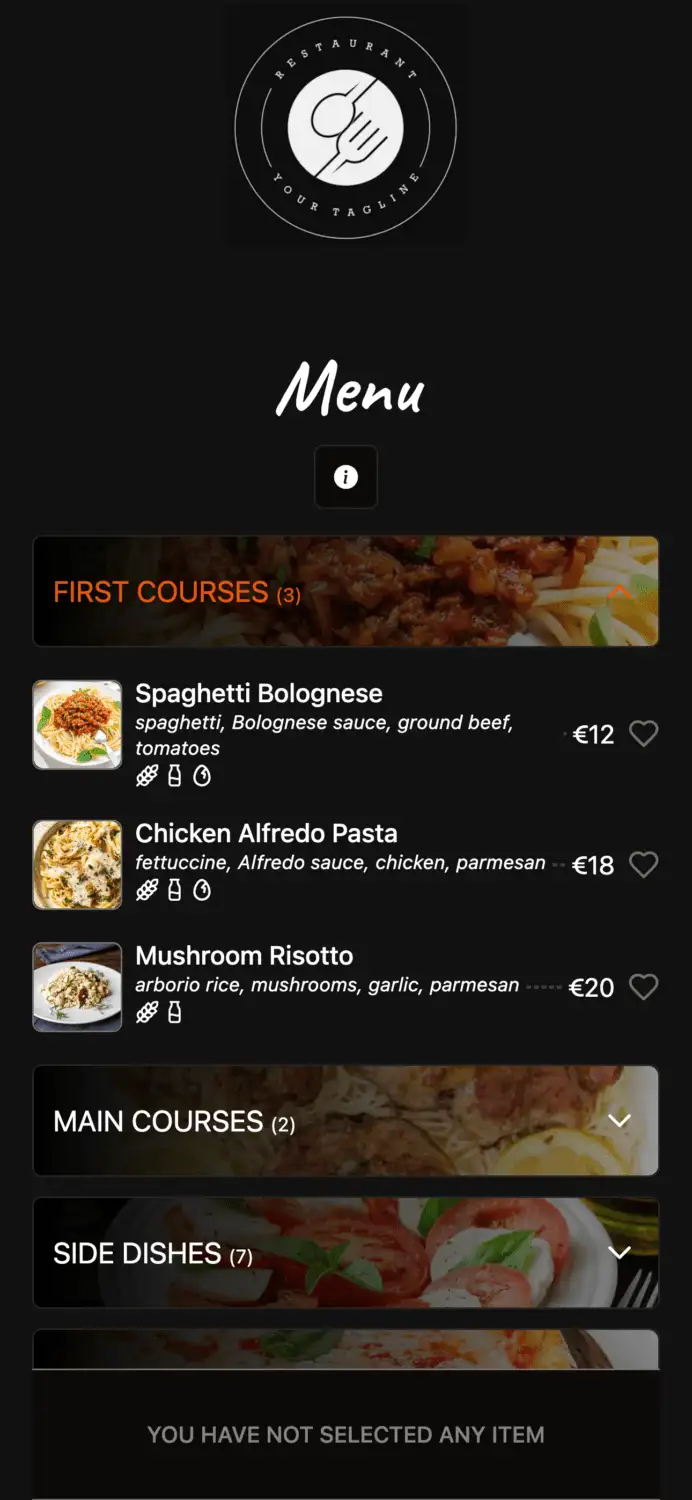
The content of a printed menu and a phone menu should be identical; what changes is how guests move through it. Plan both from the same dish list.
| Printed menu | Phone menu | |
|---|---|---|
| How guests read it | Whole page at once, eyes jump around | Top to bottom, one section at a time |
| What to put first | Dishes you most want to sell, where the eye lands on the page | Sections in eating order, with a short section list to jump to |
| Photos | Few or none; each one costs space | One good photo per dish helps guests choose |
| Allergens | Numbers or icons plus a key | Icons on each dish, visible without extra taps |
| Languages | Two at most before the page gets crowded | Guest picks a language |
| Price changes | Reprint every copy | Edit once, live for every table |
This is where a digital menu earns its place. With Elegant Menu, the QR menu and ordering platform, you build the menu once from your dish list, change a price or hide a sold-out dish without reprinting, and tag each dish with any of the 14 EU allergens, which guests see as icons on the dish. The venue still decides which allergens each dish contains, so the information is only as accurate as what you enter. Translations cover 1 language on the Basic plan and 8 on Standard, and the in-app menu assistant can apply bulk changes such as new prices after you approve each one. Keep a printed copy as well: in some countries a QR code alone is not enough (see below).
How do you show prices on a menu by law?
Across Europe, menu prices must be the final price the guest pays, and many countries also require prices to be visible before the guest sits down. The details differ by country. This summary is not legal advice; check the linked source or your local chamber of commerce.
| Country | What the source says (checked November 2026) |
|---|---|
| Germany | Restaurants must list prices in a price list on tables, handed out or posted; a list of the main items must be posted next to the entrance; prices must include service and all other surcharges (§ 13 PAngV). |
| Italy | Prices must be visible at the entrance and on the menu, including any supplement such as table service or the coperto (Altroconsumo); a QR code alone does not meet the display requirement, according to Il Fatto Alimentare (May 2026). |
| France | Menus and set menus, plus the prices of at least five wines, must be readable from outside during service; prices are shown “service compris” (CCI Paris Île-de-France, citing the arrêté of 27 March 1987). |
| Spain | Prices must be final and include VAT; display rules are set by each region, e.g. Andalusia requires the price list inside and, for restaurants, outside (Consumo Responde). |
| Turkey | Since 1 January 2024, price lists must be posted at the entrance and on the tables (Ministry of Trade); since January 2026, no service, table or cover charge may be added (Ministry of Trade). |
| UAE | Businesses registered for VAT must display prices inclusive of tax (Gulf News, citing the Federal Tax Authority). |
Checklist before you print your menu
Run this checklist on the final draft, not on an earlier version. It takes ten minutes and saves a reprint.
- Every dish has a name, a description, a price and allergen information.
- Every price matches the till system.
- Prices are final, including VAT and any surcharge, and the currency note is at the top.
- The allergen key matches the numbers or icons you used.
- The kitchen confirms it can make every dish on a full night.
- Someone who has never seen the menu has proofread it.
- Text is readable in your dining room’s real light, at arm’s length.
- The printed menu, the phone menu and the website show the same dishes and prices.
Common mistakes when making a restaurant menu
Most menu problems come from adding things over time and never taking anything away. Watch for these:
- Too many dishes. A long menu is slower to read, slower to cook and harder to keep fresh.
- Prices set by feel. Without the plate cost, a popular dish can lose money every time it sells.
- Hidden extras. A cover charge or supplement that is not on the menu leads to disputes and, in some countries, fines.
- Allergens as an afterthought. Adding them after printing usually means a sticker or a second sheet nobody reads.
- Two versions of the menu. A printed menu, a website PDF and a delivery app that all show different prices.
- Design over legibility. Thin script fonts, dark backgrounds and small type look good on screen and fail in a dim dining room.
FAQ: making a restaurant menu
How many items should a restaurant menu have?
There is no fixed number; keep as many dishes as your kitchen can make well on its busiest night. A study reported by UpMenu found diners preferred about six items per category in quick service and seven to ten in fine dining, which is a useful starting point.
Should menu prices include VAT?
Yes, show the final price including VAT and any surcharge. Germany, Spain and the UAE state this explicitly in the sources above, and other countries require the price guests see to match what they pay.
Should I put the euro sign next to every price?
No, one note at the top (“Prices in euros, VAT included”) is enough and keeps the page cleaner. Write prices as plain numbers such as 14 or 14.50.
What order should menu sections be in?
Put sections in the order guests eat: starters, mains (or pasta and mains), sides, desserts, then drinks. On a phone menu, add a short section list at the top so guests can jump straight to drinks or desserts.
Can I use only a QR code menu?
It depends on the country, so keep a printed menu or price list available. In Italy, Il Fatto Alimentare reports that a QR code alone does not meet the price display rules, and Germany, France and Turkey require prices posted at or near the entrance.
Build your menu once and keep it up to date
Once your dish list, descriptions, prices and allergens are ready, put them into a phone menu guests can open from the table, and change prices whenever your costs change without reprinting.
Comments